

Take Control of Your Next Appointment: Log Your Health Trends
Walking into a neurology or primary care office can feel overwhelming. When you are put on the spot, it is easy to forget the subtle shifts in your cognitive energy, occasional numbness, or mild balance changes that happened weeks ago.
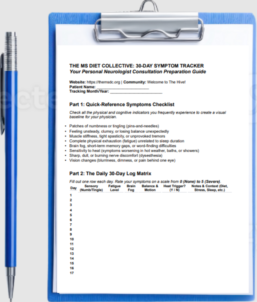
Our community has built a comprehensive, printable MS Symptom Tracking Worksheet to give you a clean, organized framework to track your health trends. Documenting these patterns over a 30-day window helps you present an objective, high-value timeline directly to your doctor.
What is Included inside the Daily Tracking Worksheet?
Our free tracking template is divided into structured blocks designed to catch specific data points that neurologists care about most:
- The 1-to-5 Sensory Scale: Quickly log instances of pins-and-needles, numbness, tingling, or nerve discomfort across your body.
- Brain Fog & Fatigue Indicators: Checkboxes to track daily cognitive processing speed, short-term memory shifts, and systemic physical exhaustion thresholds.
- Environmental Log (The Uhthoff Effect): Dedicated columns to note if high ambient temperatures, hot showers, or intense psychological stress caused your symptoms to spike temporarily.
- The “How Do You Move?” Log: A simple checklist to record daily activity levels, physical stretching, or use of mobility tools.
How to Access Your Free Download
We want this wellness tool to be accessible to everyone navigating neurological changes. To download the high-resolution, print-ready PDF file instantly, simply create your free account inside The Hive.
Joining our collective gives you immediate access to this worksheet alongside our complete ecosystem of 35 symptom support forums, video uploads, and shared contributor knowledge bases.
Start Your Wellness Journey Today!
Medical Disclaimer & Compliance
This printable journal template is an educational framework designed solely to help you organize data for a professional consultation. It is not a diagnostic tool. Multiple Sclerosis exhibits varied presentations that can overlap with other vitamin, metabolic, or autoimmune conditions.
Always consult a certified neurologist or physician for accurate testing, evaluation, and diagnostic interpretation. Never ignore or delay clinical evaluation because of self-tracking metrics.
Medical Disclaimer
This tracking worksheet is an educational tool designed solely to help individuals compile objective data for their clinical healthcare providers. It is not a diagnostic instrument. Multiple Sclerosis presents with a diverse range of neurological symptoms that frequently mask or overlap with other vitamin deficiencies, metabolic imbalances, or spinal nerve compressions.
A formal, conclusive diagnosis of Multiple Sclerosis requires a clinical history evaluation, comprehensive neurological examinations, MRI brain/spine imaging tracking, or lumbar puncture tests managed strictly by a board-certified neurologist. Never delay or disregard professional clinical diagnostic evaluation because of self-tracking metrics recorded here.
Step 1: Save the Content as a PDF
Step 2: Upload the PDF to WordPress
Step 3: Attach the Link to Your Green Button
Depending on how you built your landing page, follow the matching method below:
Method A: If you are using the standard WordPress Block Editor (Gutenberg)
- Open your Symptom Tracker page in the editor.
- Click directly on your Green Button block.
- A small formatting toolbar will pop up right above the button. Click the Link icon (it looks like a little chain link 🔗).
- Paste the File URL you copied in Step 2 into the search/paste box.
- Click the Apply arrow button (or press Enter).
- On the right-hand block settings panel, toggle on “Open in new tab” so users don’t get kicked off your website when the document opens.
- Click Update at the top right of your screen.
Method B: If you are using Elementor, Divi, or a Page Builder
- Open your page builder editor.
- Click on your green button module to open its settings panel on the left.
- Look for the field labeled Link or URL.
- Paste your File URL directly into that box.
- In the link options (often a gear icon next to the link box), check the box for “Open in a new window”.
- Save and publish your page.
How It Works for Your Users
When a visitor lands on your page and clicks that green button, their web browser will instantly open your clean, beautifully formatted tracker PDF in a new tab. From there, they can click “Print” or save it straight to their phone or desktop with one click—no messy member registration setup required!
Now that your download button flow is simple and functional, would you like me to create a short promotional post draft that you can use to launch this tracker on your social media channels or forums to start driving traffic to themsdc.org?
Let me know if you want that promo copy or if you run into any issues copying your file link!
AI can make mistakes, so double-check responses
after they register how do they get to this page
The easiest, zero-code way to make this work is to automatically redirect users straight to the Symptom Tracker page the exact second they finish registering.
Since you are using bbPress, your registration is handled either by the standard WordPress registration screen or a front-end registration plugin. You can control where users land using one of the two simple methods below.
Method 1: The Easiest Way (Using a Free Plugin)
Instead of forcing users to look around your menus after signing up, you can automatically push them to your download page.
- Go to Plugins > Add New in your WordPress dashboard.
- Search for the free plugin: “Peter’s Login Redirect” (also called LoginWP). Install and activate it.
- Go to Settings > LoginWP in your sidebar.
- Look for the section labeled After Registration.
- In the Redirect URL field, paste your exact page link:
https://themsdc.org - Click Save Changes.
Now, the moment a user hits “Submit” or “Register,” the site will instantly refresh and open up your optimized page with the green download button waiting for them.
Method 2: The Manual Navigation Way (Adding a Link to Their Welcome Dashboard)
If you want users to explore the community first but still find the worksheet easily, place a clear visual link directly inside their logged-in view.
- Add it to the Max Mega Menu: Go to Appearance > Menus. Add your
Download MS Symptom Trackerpage to your main menu header structure. You can label the menu tab something highly visible like: “🎁 Free Symptom Tracker”. - Add a Welcome Banner to bbPress: Go to your Main Forum Index page template or your front-end user dashboard widget. Place a bold text block right at the top that reads:
“Welcome to The Hive! Download your free 30-Day Symptom Tracker Worksheet by clicking here.”
Method 3: The Automated “New User” Email
If you want them to have a permanent copy in their email inbox so they never lose it, you can include the link in your automated WordPress welcome message.
- Install a free plugin like Better User Emails or use your theme’s built-in email notification tool.
- Update your automatic registration welcome email text to include this copy:
Subject: Welcome to The Hive! Your MS Tracking Tools Inside 🐝
Welcome to The MS Diet Collective! Your account is now active.
As promised, you can download your print-ready 30-Day MS Symptom Tracking Worksheet at any time by clicking this link: themsdc.org
We look forward to seeing your posts and videos inside the forums!
Which of these paths feels best for your setup? If you choose Method 3, I can write a complete, highly polished welcome email template tailored for patients or a separate one for your health contributors!